
Step 1 – Create an Account for Cisco Webex
How you can create an Account for Cisco Webex depends on how you want to access. The creation takes place via the VoIP-Portal. Only the way to reach it is different.
- From External Network (Home network, UKSH network, public network)
- From Internal Network (Network of your institute, UzL-WLAN, eduroam)
1. From External Network (Home network, UKSH network, public network)
To register for Webex from a Home or public network, you have to use the VPN client Cisco Secure Client which makes a secure connection to resources of the university. Information and how to get the VPN client see here.
Open the client and login.

As soon as a connection is established you are in an internal network of the university. So, please follow the steps from an internal network.
From Internal Network for Employees and Students(Network of your institute, UzLWLAN, eduroam)
Please visit the website https://voip-portal.uni-luebeck.de via web browser (Firefox, Chrome, Internet Explorer, Opera, Safari).
Log in with your IDM credentials.

Klick on the Webex stile after successful log in.
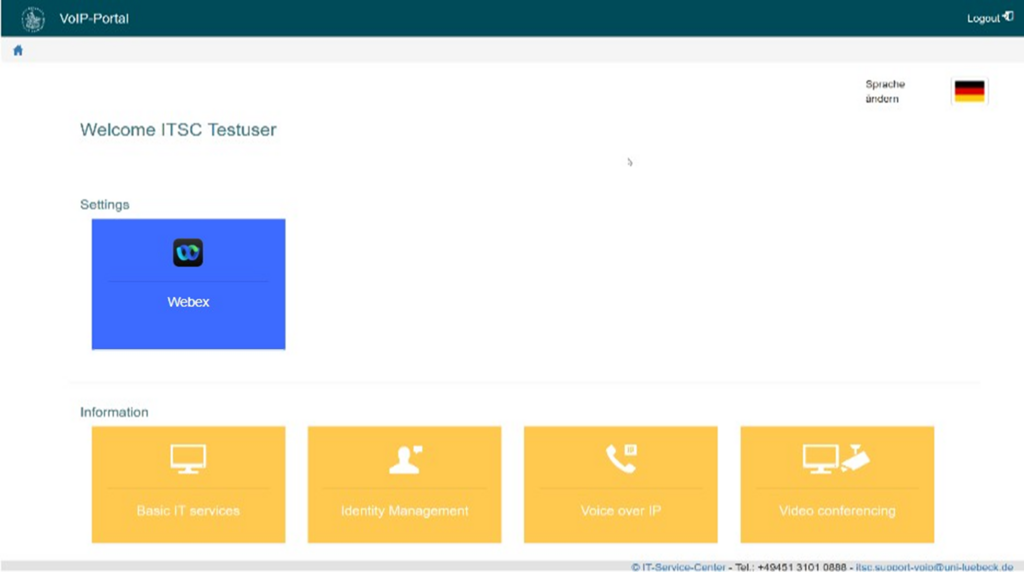
Now you have to click on the green button to create your account.


- Dienstleistungen
- IT-Basisdienste
- IT-Infrastruktur
- Datennetzanschluss (LAN)
- Drahtlosnetze (WLAN)
- Telefonie (VoIP)
- Video und Kollaboration (Webex)
- Webex - Anleitungen
- Erste Schritte
- Schritt 1 – Account für Cisco Webex anlegen
- Step 1 – Create an Account for Cisco Webex
- Desktop- App – Download, Installation und Anmeldung
- Anmeldung bei Webex
- Systemanforderungen - Webex
- Sicherheit
- Webex App - Überblick
- Meetingfenster - Überblick
- Uni-Telefonie
- Fehlerbehebung/Tipps und Tricks
- Detaillierte Anleitungen
- Miro
- Erste Schritte
- FAQ
- Anleitungen zu Videokonferenzsystemen
- Webex - Anleitungen
- Panopto (Videoplattform)
- Fernzugang (VPN)
- Medientechnik
- OMICS
- IT-Sicherheit
- Wissenschaftliches Rechnen